IDE - Visual Studio 2019
언어 - C#
FrameWork - NET 5.0
참조 - https://docs.microsoft.com/ko-kr/dotnet/api/system.diagnostics.textwritertracelistener?view=net-6.0
System.Diagnostics 네임스페이스
시스템 프로세스, 이벤트 로그 및 성능 카운터와 상호 작용할 수 있는 클래스를 제공합니다. Provides classes that allow you to interact with system processes, event logs, and performance counters.
docs.microsoft.com
Program Dubug 시, 간단한 Log를 콘솔이나 파일 혹은 이벤트 로그에 남기기 위한 코드
[ CODE ]
      // 1. DefaultTraceListener 사용. VS Output 창에 로깅
        Trace.WriteLine("Default Logging");

        // 2. 콘솔에 로깅
        Trace.Listeners.Clear();
        Trace.Listeners.Add(new ConsoleTraceListener());
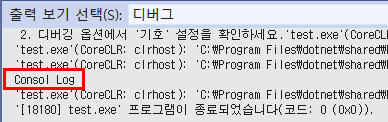
        Trace.WriteLine("Console Log");

        // 3. 파일에 로깅
        Trace.Listeners.Clear();
        Trace.Listeners.Add(new TextWriterTraceListener("Logs.txt"));
        Trace.AutoFlush = true;
        Trace.WriteLine("File Log");
        //Trace.Flush();  // AutoFlush 하지 않으면 수동으로 Flush 할 것

        // 4. EventLog에 로깅
        Trace.Listeners.Clear();
        Trace.Listeners.Add(new EventLogTraceListener("Application"));
        Trace.WriteLine("My Event Log");

        // 5. 콘솔과 파일에 동시 로깅
        Trace.Listeners.Clear();
        Trace.Listeners.Add(new ConsoleTraceListener());
        Trace.Listeners.Add(new TextWriterTraceListener("Logs.txt"));
        Trace.AutoFlush = true;
        // Trace*() 메서드들 사용
        Trace.TraceInformation("My Info");
        Trace.TraceWarning("My Warning");
        Trace.TraceError("My Error");
'Language - C# > C#(문법)' 카테고리의 다른 글
| C# - 프레임 워크 및 버전 기본값 / 메모 (0) | 2022.01.04 |
|---|---|
| C# - Enum 열거형 LINQ 사용 (0) | 2021.11.25 |
| Python & C# 이용한 Socket 통신 (0) | 2021.11.10 |
| C# - Visual Studio Python 연동 - 2 (0) | 2021.11.10 |
| C# - Visual Studio Python 연동 - 1 (0) | 2021.11.10 |